
T for Technology
In ETEC 565, Learning Technologies: Selection, Design and Application, I learned how to evaluate, select and use a number of learning technologies. I believe this course was a great demonstration of constructivism pedagogy in the way it was built and the hands-on projects we did were very engaging. In fact, the way learning occurred in this course was often by Problem-Based Learning (PBL) where situated learning was clearly taking place. Some activities were also approached by Inquiry-Based Learning (IBL) where the goal is to generate questions instead of answers. Both approaches facilitate students’ understanding while promoting reflection and discussion. Students shared their thoughts and questions and discussed topics in the forum, like in all courses in the MET program. Certainly, as everyone became more and more engaged during the semester, the discussion forum became a rich community of practice (CofP).
In ETEC 565 as well as in other courses in the MET program, I really felt how sharing knowledge with peers can be beneficial to improve learning and build our own knowledge. Nevertheless, a CofP will evolve in a well-designed platform using the social constructivism approach (Vygotsky) where discussion forums are engaging and meaningful. Moreover, the presence of the online teacher (OT) who acts as a facilitator has to be evident. Baghadi (2011) stated that the OT “must serve as a guide to facilitate learning and must do that in a more pronounced way because of the lack of face-to-face interactions” (p. 110). Likewise, in ETEC 532, I discussed the role of the online teacher in an assignment called Analysis of Vignette #2: The Online Teacher’s Role (see below).
In that assignment, I quote Berge & Collins (1995) who stated that the online learning “environment requires of teachers increased written presentation skills, some technical competencies, virtual management techniques, and the ability to engage students through virtual communication” (Easton, 2003, p. 90). An online environment needs to be rich in activities and experiences in order to get students interested and an online presence is required from both students and teachers. In order to be successful, synchronous and asynchronous activities must take place. If this is maintained on a continuous basis, I believe it will create a powerful and successful social learning environment.
In ETEC 565, I have also used a new communication eTool called WimbaPronto, which allowed instant communication and collaboration among MET peers who had signed as users of the product. Indeed, I was able to talk/chat with peers and/or with the instructor in real time whenever someone was available and willing to discuss and share information. I actually exchanged ideas and collaborated through that eTool while doing an assignment and for peer editing. I enjoyed the fact that connection with peers went further than just the Blackboard platform. Our instructor, Dr. John P. Egan, also used the eTool to give us a couple of lectures on Moodle, which I really liked; seeing the teacher live and being able to discuss with fellow students in real time gave the course a new dimension. It made me reflect on how I can improve my own online teaching.
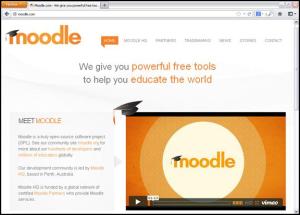
ETEC 565, for me, was a continuation of ETEC 510 in some ways because I had the opportunity to continue learning how to use the Learning Management System (LMS) called Modular Object-Oriented Dynamic Learning Environment (Moodle) (click on the picture below to see what it is about). In fact, we used the LMS to build a quiz and later on to create a course site, something I previously did in a group project in ETEC 510.
- ETEC 510 – Group Design Project called Culture and Language Panorama
- ETEC 565 – Individual Design Project called Français 12e année précollégial
Moodle
In ETEC 510, three colleagues and I developed three units of a language course; the three units were each done in a different language. The theme was travelling in a new country and the course was for beginner professionals who need to learn the language quickly. Interestingly, our group was composed of two English-speaking people, one Spanish-speaking person and one French-speaking person (me); we were located in different parts of the world, Canada, Japan and Australia. From this project, I gained a lot of knowledge and skills at using Moodle, which prepared me for a similar project in ETEC 565.
Consequently, in ETEC 565, I was able to use some skills I had already developed in ETEC 510 to create a framework for a course I was teaching in Desire2Learn (D2L). First, I had to write a proposal called Choosing Moodle to Implement a Grade 12 Applied French Online Course. In the arguments to support my proposal I considered a few elements and principles that I had learned in the course. One of my considerations was the Web 2.0 educational tools that can be utilized through the LMS to build a constructivist environment.
In ETEC 565, I have learned some criteria/principles from Bates and Poole SECTIONS (2003) that were very useful later on in my other MET courses and in my profession when deciding on an eTool for myself or my students to create a project. The authors suggested some great principles to better select eTools that can be used to help students learn. In addition, for this particular proposal, I used MIT’s Stellar course management system (Panettieri, 2007) and Universal Instructional Design (UID) (Elias, 2010) principles that were a great help.
Furthermore, in order to build Web pages for my learning site, I had to learn how to use Dreamweaver, which I found to be a difficult task. These were skills I wanted to develop, and I did, but I still need improvement in that area.
Finally, working in Moodle was sometimes very challenging. For example, it took me a while to understand how to do Splash pages with customized GUI, one of the project’s requirements. It was difficult, but by the end I had learned a great deal and it is still helping me in my teaching environment to this day.
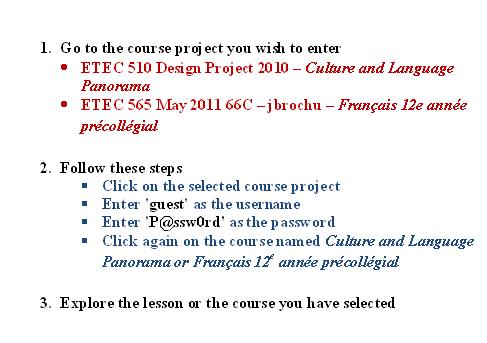
In order to access these Moodle projects, go to http://moodle.met.ubc.ca and follow the directions given by clicking on the picture below.
How to access UBC Moodle Projects? Click on this picture.
Chosen Artifacts
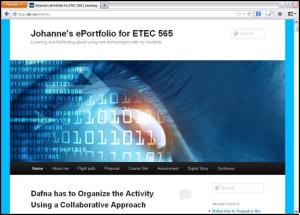
Even though I learned a lot by creating a partial course site in Moodle, for the purpose of technology in this section I choose to discuss two different artifacts: the first one is My ePortfolio for ETEC 565 and the second one is a digital story I created called Une mer sens dessus dessous (A sea upside down) using storybird.com. Click on each picture below to view the artifacts
Artifact #1: Johanne’s ePortfolio for ETEC 565
Artifact #2: A digital story called Une mer sens dessus dessous
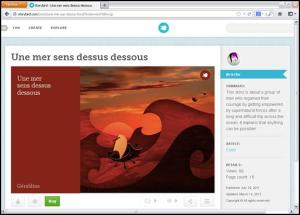
In this course, I was allowed to write my story in French which facilitated my work; I could focus on making the best use of the media instead of focusing on the language issues I would have had in writing the story in English.
Context
Both the artifacts I chose to discuss were given assignments in ETEC 565. Actually, the ePortfolio included diverse reflections on course readings and on multiple assignments done during this course. The digital story, for which the reflection can be found in the ePortfolio (click here to read that reflection), was about choosing the right eTool to create my digital storytelling, something I really enjoyed doing and learned from.
Reason
I chose the ePortfolio as my artifact as I believe it can be an interesting eTool to keep reflections and artifacts along with any learning journey, most particularly in the educational field, something I will discuss more in the section P for Pedagogy (ETEC 532). As per the digital storytelling I developed, it is clearly a way to be creative because it involves imagination and writing skills. As a language teacher, I will continue using this type of eTool to have my students create stories individually and in groups.
Discussion
Clearly it is important to choose the educational technology tools that will best fit the learning objectives we want our students to fulfil. The development of an ePortfolio in ETEC 565 was a valuable choice in this course; it allowed reflection to take place progressively along with PBL and IBL activities in which much discussion and collaboration with colleagues happened. It has allowed me to see how my learning about educational technologies, and how I can integrate them in my teaching practice, has grown in the last year. I think that learning requires that once in a while we step back a little bit just to reflect on whether what we are trying to implement in our classrooms is really the best way to improve our teaching and increase our students’ learning.
Indeed, selecting a web 2.0 tool to improve teaching or learning is something that should be taken seriously. For that reason, in this course, in order to select the right web 2.0 tool to tell a story, I had to explore diverse tools by looking at Alan Levine cogdogroo Wiki Site which was later changed for a new site in wikispaces.com. Interestingly, the author has expressed how the same story, in this case Dominoe story, can be told using 50 different web 2.0 tools. The exploration part prior to doing the project was important.
Alan Levine cogdogroo Wiki Site

Each time I had to use a new technology tool I took time to explore what would be the best for what I intended. Sometimes, I have an idea in mind of how my work will take place, then I look for a specific kind of tool. Other times it is the opposite: I have no idea how it is going to happen and the tool I choose brings about unsuspected and creative ideas on how to proceed. That is exactly what happened in this situation. It is only when I looked at storybird.com that I decided on the story I would create. The site provides nice illustrations from which we can choose from to develop a story; they inspired me to create the story I did, and at the end it gives a very professional look to the final product. I was impressed by the look this eTool gave.
Reflection
The artifacts I choose to discuss are important to me because they can be easily used in my teaching environment. As a matter of fact, my students are developing their own ePortfolio in the D2L where they keep collections of meaningful artifacts depending on what they have to achieve in each course. Likewise, using a storytelling web 2.0 tool to create a story can help students be engaged in the process of writing, something I am looking for while my students are involved in such a project. I am using similar tools to create stories like Bitstrips.com where students have to produce cartoons. Storybird is a tool I plan on using eventually. I already have contacted the support team of the site to know more about what it can offer and was told that a teacher can open a class account, which will allow my students to publish their stories in French, something you can’t do if you don’t have this type of account. I also see the potential for my students to collaborate on storytelling projects from which I believe they can learn tremendously.
In their article, Bates and Poole (2003) have discussed that the choice of media and technology should be guided by theoretical models or frameworks. In addition, the authors argued the importance of looking at the different learning styles of our students and how they are engaging themselves in the learning process. They stated that “identifying dominant learning styles should then provide strong criteria for selecting media and technology” (p. 84). They also discussed how crucial it it to consider how teaching and learning are occurring. That means ensuring that the learning environment is well organized with authentic activities “such as researching readings on the Web, online discussion forums, synchronous presentations, assignments, and online group work” as students “seek out new or different information” (Bates & Poole, 2003, p. 86). However, it is important to keep in mind that even though students can progress at their own pace, they have to receive the support they need.
Finally, I found the ISTE NETS and Performance Indicators for teachers and students interesting standards to meet. ISTE NETS proposes competencies that both teachers and students should consider as they engage in this digital age, where, according to Hon. A. Murray, the 2012 Minister of Training, Colleges and Universities in Ontario in Spotlight (MTCU, 2012) “Education is in the Age of Acceleration,” a digital age in which creativity, communication and collaboration are of prime importance.
My very special thanks to Dr. John P. Egan for his ongoing dedication toward his students and his indispensable advice and support, which I clearly benefited from during this course (Summer 2011).
References
Anderson, T. (2008a). Towards a Theory of Online Learning. In: Anderson, T. & Elloumi, F. Theory and Practice of Online Learning. Athabasca University. Retrieved from http://www.aupress.ca/books/120/ebook/02_Anderson_2008_Anderson-Online_Learning.pdf
Baghadi, Z. D. (2011). Best practices in online education: Online instructors, courses, and administrators. Turkish Online Journal of Distance Education, 12(3), 109-117. Retrieved from https://tojde.anadolu.edu.tr/tojde43/pdf/article_4.pdf
Bates A. W. & Poole, G. (2003). Chapter 4: A Framework for Selecting and Using Technology. In Effective Teaching with Technology in Higher Education: Foundations for Success. (pp. 77-105). San Francisco: Jossey-Bass. 4. Retrieved from https://www.vista.ubc.ca/webct/urw/lc5620062503281.tp5620062526281/cobaltMainFrame.dowebct
Chickering, A. W. & Ehrmann, S. C. (1996). Implementing the seven principles: Technology as lever. American Association for Higher Education Bulletin, 49(2), 3-6. Retrieved from http://www.aahea.org/bulletins/articles/sevenprinciples.htm
Easton, S. (2003). Clarifying the instructor’s role in online distance learning. Communication Education, 52(2), 87-105. Retrieved from http://www.tandfonline.com/doi/pdf/10.1080/03634520302470
Elias, T. (2010). Universal Instructional Design Principles for Moodle. International Review of Research in Open and Distance Learning, 11(2), 110-124. Retrieved from ERIC database (EJ895752).
National Educational Technology Standards for Students. Retrieved from http://www.iste.org/standards/nets-for-students.aspx
National Educational Technology Standards for Teachers. Retrieved from http://www.iste.org/Content/NavigationMenu/NETS/ForTeachers/2008Standards/NETS_for_Teachers_2008.html
Ontario Ministry of Training, Colleges and Universities (MTCU). (2012). Spotlight. Retrieved from http://www.tcu.gov.on.ca/eng/spotlight/march2012-12.html
Palloff, R. M., & Pratt, K. (2005). Collaborating online: Learning together in community. San Francisco, CA: Jossey-Bass.
Panettieri, J. (2007). Addition by subtraction. University Business, August, 58-62. Retrieved from http://www.universtybusiness.com/viewarticle.aspx?articleid=845
 Johanne Brochu's MET ePortfolio
I do not even know how I ended up here, but I thought this post was great.
I do not know who you are but definitely you’re going to be a
famous blogger if you are not already 😉 Cheers!
Thank you very much! This is very nice! 🙂
It’s an remarkable article for all the online viewers; they will
take advantage from it I am sure.
Thank you!
This is my first time go to see at here and i am genuinely pleassant to read all at alone place.
Thank you!!
If some one wants to be updated with most recent technologies
after that he must be visit this wweb site and be up to date all the
time.
Hi, this weekend is nice designed for me,
because this moment i am reading this fantastic educational article here at my house.
Lovely webpage, it loads really fast and looks really cool.
Thank you very much!